Best email verification tools, ranked by live price
Email verification tools compared by what each returns, the input it takes and its live price per call, read from the looot catalog. One address per call.
The looot team · , updated · 11 min read
On this page
Email verification tools check whether an address can receive mail before you send to it. Each one takes an email, runs syntax, mail server and mailbox checks, and returns a verdict such as valid, invalid, catch-all or unknown, often with a score. The tools differ in the fields they return and in what a call costs.
This post compares email verification tools for an agent that checks addresses one at a time. It covers looot, the gateway that calls the others, and eight providers from the looot catalog. You get a matrix of what each returns, live prices, a guide for choosing, a prompt and a FAQ.
Email verification tools: the short answer
No single tool wins every job. Each bullet names one need.
- looot, best for calling any verifier below through one connection and one balance.
- Icypeas, best for a certainty value plus the mail server for each address.
- LeadMagic, best when you also want company details for the domain.
- Limadata, best for a plain result and score from live SMTP and identity checks.
- Tomba, best for status, score and catch-all flag, plus the pages where the address was seen.
- ZeroBounce, best for typo suggestions and domain age.
- Hunter, best for a score from 0 to 100 and the individual checks behind it.
- Findymail, best for a simple true or false verdict.
- Anysite, best when a verdict already on file is acceptable.
| Provider | Returns | Input | Best for | Named drawback |
|---|---|---|---|---|
| looot | The provider's own response | What the chosen endpoint takes | One connection to all of them | No web interface for building lists |
| Icypeas | Status, certainty, mail server per address | Mail server detail | The call can wait up to 60 seconds | |
| LeadMagic | Email status, mail server, company details | Company context for the domain | Company fields appear only when the domain is known | |
| Limadata | Result and score | Live SMTP and identity checks | Bills every call, whatever the result | |
| Tomba | Status, result, score, catch-all, MX and SMTP checks, sources | Seeing where an address appeared | Optional enrich_mobile parameter, read its effect first | |
| ZeroBounce | Address, domain, did-you-mean, free-email flag, domain age, catch-all | Email, optional IP | Typo repair | Billed one credit per address, no numeric score listed |
| Hunter | Status, result, score 0 to 100, nine named checks, sources | Seeing why an address failed | An older duplicate endpoint exists, use the new one | |
| Findymail | Email, verified true or false, mail provider | A yes or no | One verifier credit on every attempt, no score | |
| Anysite | Deliverability verdict | Email, optional timeout | Re-using a stored verdict | The verdict may come from a stored check |
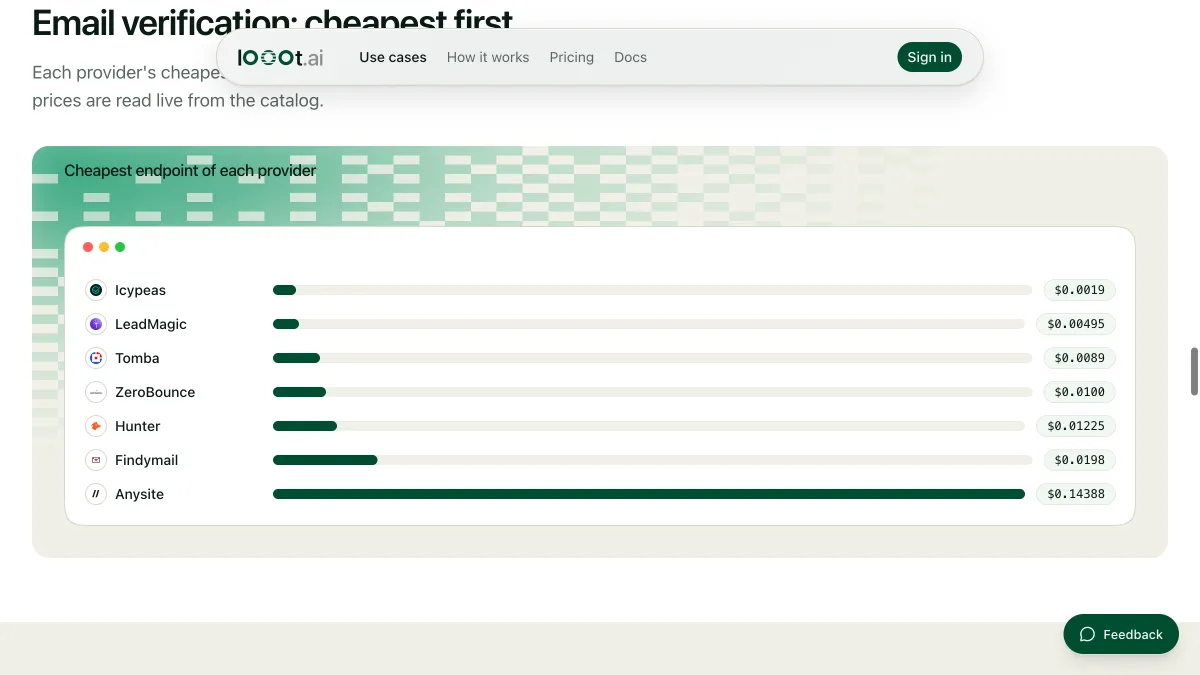
Prices are read from the catalog when the page loads, one row per provider.
How we ranked these email verification tools
We read the public looot catalog on 2026-10-11. Each provider below has an endpoint tagged people_email_verify. We ordered entries 2 to 9 by the price per call of that endpoint, cheapest first. Every endpoint here checks one address per call, so the order says nothing about accuracy.
looot is listed first because it is the way to call the others, and looot publishes this post, so discount that placement. We did not run these endpoints for this post. The catalog publishes no measured success rate for them, so we rank on none and quote none. Other verifiers exist in the live catalog. We name only the ones we checked against our provider snapshot.
1. looot, best for one connection to every verifier
looot is a gateway. Your agent connects once with a token, searches the catalog for "verify an email address", reads the price and inputs of each endpoint, and runs the one you pick. The result is the provider's own response. Each call costs the price of the underlying endpoint, and the price shows before the call.
Best for
- Running two verifiers on the same twenty addresses to see where they disagree.
- Sending only the unclear rows to a second verifier.
Limits
- There is no web interface for building lists. You call it from an agent, the CLI or the API.
- You pay the underlying provider's price. looot adds no data of its own.
Does not fit someone who wants to upload a CSV and click Verify.
2. Icypeas, best for certainty and mail server detail
The endpoint icypeas-email-verify takes an email and waits up to 60 seconds for Icypeas to finish. It returns a status of FOUND or NOT_FOUND and, for each address, the email, a certainty value, the MX records and the MX provider. The catalog says it detects catch-all domains.
Best for
- Rows where you want to see the mail provider behind each address.
- Long lists where price per call decides.
Limits
- The wait of up to 60 seconds slows a loop over thousands of rows.
Does not fit a flow that needs an answer in a second.
3. LeadMagic, best for company context
The endpoint leadmagic-email-verify takes an email and returns an email status, the mail server (mx_record and mx_provider) and whether the domain is catch-all. When LeadMagic knows the domain, it adds company_name, company_industry and company_size.
Best for
- Checking an address and learning what company sits behind it in one call.
- Cleaning a list that mixes work and free-mail addresses.
Limits
- Company fields are present only when LeadMagic knows the domain.
Does not fit a list of free-mail addresses where you want company data.
4. Limadata, best for a result and a score
The endpoint limadata-api-find-email-verify runs real-time SMTP and identity checks on one email. It returns a result and a score. The catalog says each call bills the same whatever the result.
Best for
- A compact answer you can threshold on.
- Pipelines that already store a score column.
Limits
- It returns two fields. There is no breakdown of which check failed.
- A call that ends unclear still bills.
Does not fit debugging why a particular address failed.
5. Tomba, best for sources and flags
The endpoint tomba-email-verifier takes an email. It returns the status, result, score, accept_all (catch-all), mx_check and smtp_check, plus data.sources, the places where the address was seen. It also accepts a webhook_url and an enrich_mobile option.
Best for
- Seeing where an address appeared before you trust it.
- Reading the catch-all flag separately from the verdict.
Limits
- It takes an optional enrich_mobile parameter. Read the endpoint description before turning it on.
Does not fit the plainest yes or no job.
6. ZeroBounce, best for typo repair
The endpoint zerobounce-validate takes an email and an optional ip_address. It returns the address, domain, did_you_mean, free_email, domain_age_days and catchall_domain. The catalog says it bills one credit per address.
Best for
- Lists typed by hand, where gmial.com should become gmail.com.
- Spotting very young domains by their age in days.
Limits
- The catalog lists no numeric score or per-check breakdown.
Does not fit a pipeline that thresholds on a score.
7. Hunter, best for seeing why an address failed

The endpoint hunter-email-verifier takes an email and returns data.status, data.result, a score from 0 to 100 and the checks behind them: regexp, gibberish, disposable, webmail, mx_records, smtp_server, smtp_check, accept_all and block. It also lists the sources where the address was seen. An older copy, hunter-email-verify, is still listed. Use the newer one.
Best for
- Auditing why a batch bounced.
- Filtering out disposable and gibberish addresses by name.
Limits
- Two Hunter verify endpoints exist. Pick hunter-email-verifier.
Does not fit the cheapest possible pass over a very large list.
8. Findymail, best for a plain verdict
The endpoint findymail-api-verify takes an email and returns the email, a verified value of true or false and the provider, meaning the mail provider. The catalog says it uses one verifier credit on every attempt.
Best for
- A boolean you can filter on without parsing anything.
- Teams that already use Findymail to find emails and want one vendor for both steps.
Limits
- No score and no catch-all flag in the described output.
Does not fit a list full of catch-all domains.
9. Anysite, best when a stored verdict is fine

The endpoint anysite-api-emails-verify takes an email and an optional timeout. It checks syntax, MX and mailbox, or returns a verdict already on file. The catalog says it can answer from a stored check.
Best for
- Occasional single checks where you already hold an Anysite connection.
Limits
- A verdict already on file may be older than a fresh check.
- Check its row in the live table before a large run.
Does not fit large lists.
How to choose
How many addresses do you check?
Under a hundred, price barely matters and the fields do. Pick Hunter for the named checks or ZeroBounce for typo repair. Past a few thousand, read the price rows and the billing notes. What 1,000 lookups cost shows the arithmetic.
Do you need bulk verification?
Every endpoint here verifies one address per call. There is no bulk upload endpoint among the providers named in this post. A bulk run means your agent loops over a column and makes one call per row, so the total is the per-call price times the rows. Say the row count in your prompt so the agent can stop at a budget.
Do you also find the emails?
Then check the finder side first. The best email finder tools ranks the catalog's finders. Several providers in this post, including Hunter, Icypeas, LeadMagic, Limadata, Tomba and Findymail, offer both steps.
| Your need | Pick | Why |
|---|---|---|
| Lowest cost on a long list | The top row of the live table | The ranking is by price per call |
| Know why an address failed | Hunter | Names each check |
| Fix typos in hand-typed lists | ZeroBounce | Returns did_you_mean |
| A single boolean | Findymail | Returns verified true or false |
| Company context with the verdict | LeadMagic | Adds company name, industry and size |
| See where the address appeared | Tomba | Returns data.sources |
| Compare two verifiers | looot | One connection, same rows through two endpoints |
How to run this with an agent
- Connect your agent to looot once. Paste the setup line from the prompt below.
- Ask it to search the catalog for "verify an email address". It returns each endpoint with its inputs and price.
- Give it a small sample, twenty addresses, and name two verifiers to compare.
- Read the side by side table the agent writes. Look at the rows where the verifiers disagree.
- Run the cheaper one on the full list, with a budget cap in the prompt.

Prompt for your agent
Verify a column of emails
For the endpoint list behind this post, browse the email verification use case.
What this post does not cover
It covers one address per call. It does not cover bulk upload tools, inbox placement or spam testing. It makes no claim about how accurate any verifier is, because the catalog publishes no measured rate for these endpoints. Re-checking an old list on a timer needs scheduled runs, not available yet, so run it by hand. Verifiers in the live catalog that are not in our provider snapshot are left out until the snapshot is refreshed.
Last checked 2026-10-11 against the public catalog at https://api.looot.ai/v1/public-catalog. Author: the looot team.
Questions
Keep reading
Why does my AI agent make up emails, and how do I stop it?
An agent with no email tool will guess one from a pattern and sound sure. Why it happens, how to tell found from guessed, and the skill that stops it.
The looot team · · 4 min read
What 1,000 lookups cost: reading the looot catalog
How to work out the cost of 1,000 lookups from the live looot catalog, and why the cheapest provider is chosen per call instead of once per project.
Luisa · · 4 min read
Waterfall enrichment explained: how it works and where it breaks
Waterfall enrichment tries one data provider, then the next on a miss. How it works, why order matters, a prompt to run it with an agent, and the limits.
Walid Boulanouar · · 5 min read
Try it with the agent you already use
Start your workspace, top up, and paste one prompt into your agent.