Best email finder tools, compared by what a miss costs
Email finder tools compared by input, output and live price per call, read from the looot catalog, with a note on which ones bill you when no email is found.
The looot team · , updated · 13 min read
On this page
Email finder tools take what you know about a person, such as a name and a company domain or a LinkedIn URL, and return a work email. They differ in what they accept, what else they return, and what they charge when they find nothing. That last point matters more than the headline price once you run a few hundred rows.
This post compares email finder tools for an agent that looks up people one at a time or lists the addresses at a domain. It covers looot, the gateway that calls the others, and eight providers from the looot catalog. You get a matrix, live prices, a guide for choosing, a prompt and a FAQ.
Email finder tools: the short answer
No single finder fits every list. Each bullet names one need.
- looot, best for trying several finders on the same rows through one connection.
- QuickEnrich, best for a LinkedIn URL or name plus company URL, billed only when an email comes back.
- Tomba, best for name plus domain with position and department in the answer, and a free domain format lookup.
- AI Ark, best for a profile plus a verified email from an AI Ark id or a LinkedIn URL.
- Icypeas, best for name plus domain with a certainty value and the mail server.
- Findymail, best for a verified email from a name and company, or from a LinkedIn profile.
- LeadMagic, best for name plus domain with company details attached.
- Limadata, best for name plus domain where a miss costs nothing.
- Hunter, best for a score, sources and a LinkedIn handle as the only input.
| Provider | Returns | Input | Best for | Named drawback |
|---|---|---|---|---|
| looot | The provider's own response | What the chosen endpoint takes | Trying several finders | No web interface for building lists |
| QuickEnrich | Work email | LinkedIn URL, or first name, last name and company URL | Billed only on a hit | A miss returns an empty list with a reason code |
| Tomba | Email, score, status, position, department, social links, sources | Domain or company plus a name | Rich answer fields | A search with no email is charged the same as a hit |
| AI Ark | Full profile and a verified email | AI Ark id or LinkedIn URL | Profile plus email in one call | No name plus domain input on this endpoint |
| Icypeas | Status and emails with certainty and mail server | Domain or company plus first or last name | Certainty value | The call can wait up to 60 seconds |
| Findymail | Contact with email, job title, company, domain | Name and domain, or LinkedIn URL | Verified results only | Two separate endpoints for name and LinkedIn |
| LeadMagic | Email, status, mail server, company details | Name plus domain or company name | Company context | Needs a name, not a LinkedIn URL, on this endpoint |
| Limadata | Most likely work email | Full name and company domain | Zero cost on a miss | Name and domain endpoint takes a full name only |
| Hunter | Email, score, verification status and date, position, sources | Domain or company plus name, or a LinkedIn handle | Score and sources | A search with no email is charged the same as a hit |
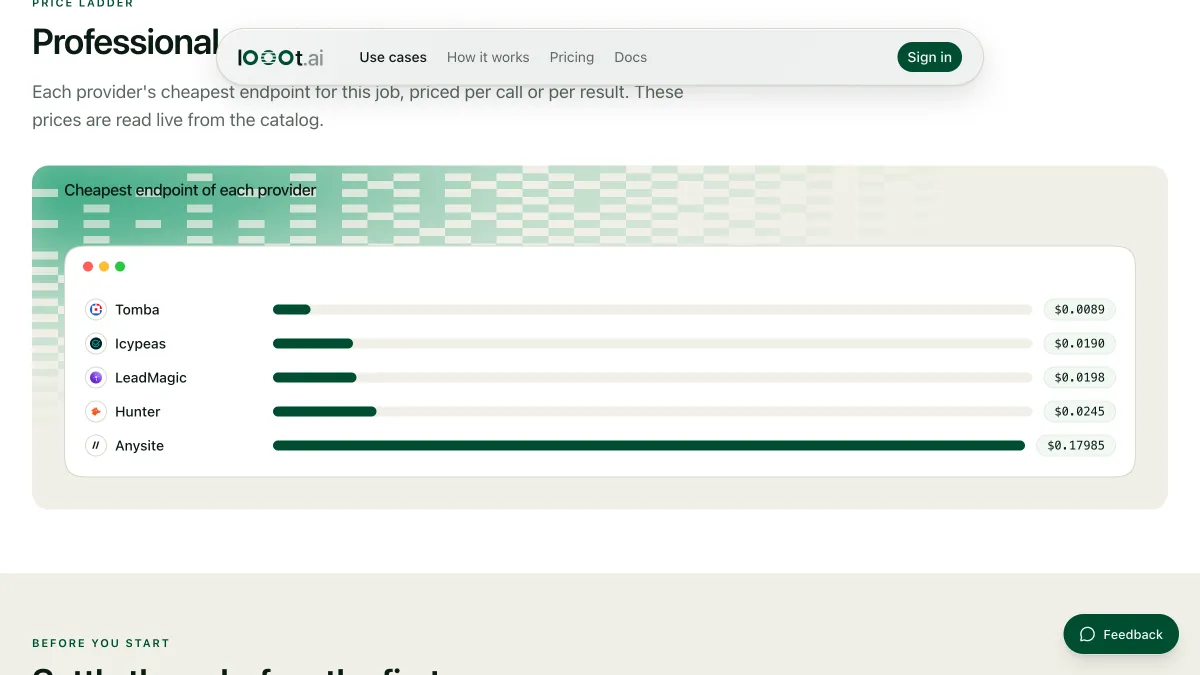
Prices are read from the catalog when the page loads, one row per provider.
How we ranked these email finder tools
We read the public looot catalog on 2026-10-11. Each provider below has an endpoint tagged people_email_find. We ordered entries 2 to 9 by the price per call of its cheapest finder endpoint, cheapest first. Billing units differ, per call or per result, and some endpoints bill only when they find an email, so read the billing note under each entry.
looot is listed first because it is the way to call the others, and looot publishes this post, so discount that placement. We did not run these endpoints for this post. The catalog publishes no measured success rate for them, so we rank on none and quote none. Three more providers in our snapshot have a finder endpoint, AnyAPI, Anysite and Aviato. We left them out to keep the list to eight.
1. looot, best for trying several finders on the same rows
looot is a gateway. Your agent connects once with a token, searches the catalog for "find a work email from a name and domain", reads each endpoint's inputs and price, and runs the one you pick. The result is the provider's own response. Each call costs the price of the underlying endpoint, and the price shows before the call.
Best for
- Running the same ten people through two finders and comparing hit rates yourself.
- Sending only the misses from a first finder to a second one.
Limits
- There is no web interface for building lists. You call it from an agent, the CLI or the API.
- You pay the underlying provider's price. looot adds no data of its own.
Does not fit someone who wants a browser extension that finds emails while they browse.
2. QuickEnrich, best for a hit-only bill
The endpoint quickenrich-api-employees-search takes a LinkedIn URL, or a first name, last name and company URL, and returns a work email. The catalog says it costs one credit only when a real email is returned. A miss returns an empty data list with the reason EMPLOYEE_NOT_FOUND and costs nothing.
Best for
- Large lists with many unknowns, where paying for misses adds up.
- Rows that carry a LinkedIn URL.
Limits
- The catalog describes the output as the work email, with no score or sources listed.
Does not fit a job that needs position and department in the same call.
3. Tomba, best for rich fields and a free format lookup
The endpoint tomba-email-finder takes a domain or company plus a full name, or a first and last name. It returns data.email with a score, verification status, accept_all, the person's position, department, LinkedIn and Twitter, and the sources where the address was seen. A second endpoint, tomba-linkedin-finder, starts from a LinkedIn URL. A third, tomba-email-format, returns the address patterns a domain uses, and the catalog marks it free.
Best for
- Rows where position and department help you decide who to contact.
- Guessing a pattern for a domain before you spend on a finder.
Limits
- The catalog says a search that finds no email is charged the same as one that does.
Does not fit a list with a high share of unknown people.
4. AI Ark, best for a profile and a verified email
The endpoint ai-ark-people-export-single takes an AI Ark id or a LinkedIn URL, the id tried first. It returns one person's profile with an email verified in real time. When the person or the email is not found, it returns HTTP 200 with data set to null, not a 404. An older version, ai-ark-people-export-single-2, answers 404 instead. Use the newer one.
Best for
- Rows that start from a LinkedIn URL where you also want the profile.
- Pipelines that treat a null result as a normal outcome.
Limits
- This endpoint does not take a name and a domain. For that, pair it with AI Ark's people search.
Does not fit a list that has only names and company domains.
5. Icypeas, best for certainty and mail server
The endpoint icypeas-email-find takes domainOrCompany plus a first name, a last name or both. It waits up to 60 seconds, then returns a status of FOUND or NOT_FOUND and the emails found, each with certainty, mxRecords and mxProvider. The catalog points to icypeas-bulk-search for more than a few people.
Best for
- Reading a certainty value before you decide to send.
- A few dozen people, with the bulk endpoint for larger sets.
Limits
- The wait of up to 60 seconds slows a long loop.
Does not fit a flow that needs an answer in a second.
6. Findymail, best for verified-only results
Two endpoints cover the job. findymail-api-search-name takes a name and a domain, where the domain can be the company website or name, and returns a contact with email, job_title, company and domain. findymail-api-search-business-profile takes a LinkedIn URL. The catalog says each uses one finder credit only when a verified email is found.
Best for
- Teams that want to pay only for emails that Findymail verified.
- Mixed lists where some rows have a LinkedIn URL and some have a name and domain.
Limits
- You pick the endpoint per row type. The catalog lists the business profile one as limited to 30 concurrent requests when used synchronously.
Does not fit a pipeline that needs a score.
7. LeadMagic, best for company context
The endpoint leadmagic-people-email-finder takes a first and last name, or a full name, plus a domain or a company name. It returns the email and its status, the mail server (mx_record and mx_provider) and company details such as company_name, company_industry and company_size.
Best for
- Rows where the company name is all you have, not a domain.
- Adding company size to the same call.
Limits
- This endpoint needs a name. A LinkedIn URL on its own is not enough here.
Does not fit a list that has only LinkedIn URLs.
8. Limadata, best for a free miss
The endpoint limadata-api-find-email-work takes a full name and a company domain and returns the most likely work email. The catalog says it costs credit only when an email is found. A not-found is a 404 and costs nothing. A second endpoint, limadata-api-find-email-work-linkedin, starts from a LinkedIn URL and has its own price.
Best for
- Lists with many unknown people, as with QuickEnrich.
- Name plus domain rows that need a no-cost miss.
Limits
- A miss comes back as a 404 error. Your agent must treat it as a normal outcome.
Does not fit a pipeline that expects HTTP 200 for every row.
9. Hunter, best for score and sources
The endpoint hunter-email-finder takes a domain or company plus a full name, or a first and last name. It can also take a linkedin_handle alone. It returns data.email with a score, verification status and date, accept_all, position, linkedin_url, phone_number and the sources where the address was seen. The catalog notes that a search that finds no email is charged the same as one that does.
Best for
- Judging an address by its score and sources before sending.
- Rows with only a LinkedIn handle.
Limits
- Misses are charged. Read the live row and the catalog note before a large run.
Does not fit the lowest cost per row on a list with many unknown people.
Listing every address at a domain
Sometimes you do not have a name. A domain search lists the addresses a provider has seen at one domain. Four providers in the snapshot offer it. Hunter lets you filter by seniority, department and job title. Tomba filters by country and department. QuickEnrich lists up to 20 contacts per page by company URL and can keep only those with an email. Icypeas returns role-based mailboxes such as contact@ and support@, and you read the addresses afterwards with a second call.
How to choose
What do you start with?
A name and a domain points to Tomba, Icypeas, LeadMagic, Limadata or Hunter. A LinkedIn URL points to QuickEnrich, AI Ark or Findymail. Only a domain points to a domain search. Read the company email format use case if you want to guess a pattern first.
What does a miss cost you?
If a third of your rows have no email anywhere, billing on a miss decides the total. QuickEnrich, Findymail and Limadata bill only on a hit, according to their catalog descriptions. Tomba and Hunter bill a miss. What 1,000 lookups cost shows how to work it out for your own hit rate.
Do you verify the result?
Some finders return a verification status, and others return only an address. Run unverified addresses through a verifier. The best email verification tools ranks them.
| Your need | Pick | Why |
|---|---|---|
| Pay only for hits | QuickEnrich, Findymail or Limadata | Catalog says a miss is not billed |
| Profile plus email from a LinkedIn URL | AI Ark | Returns the profile and a verified email |
| Position and department with the email | Tomba or Hunter | Both return the position |
| Company size with the email | LeadMagic | Returns company_size |
| Score and sources | Hunter or Tomba | Both return a score and sources |
| Compare two finders on your list | looot | One connection, same rows through two endpoints |
How to run this with an agent
- Connect your agent to looot once with the setup line in the prompt below.
- Ask it to search the catalog for "find a work email from a name and domain" and list each endpoint with its inputs and price.
- Give it ten people from your list that you already know the email of.
- Compare what each finder returned against what you know. Count the hits and the misses per provider.
- Run the one you trust on the full list, with a budget cap in the prompt.
Prompt for your agent
Compare email finders on ten known people
What this post does not cover
It covers one person per call and the domain search. It does not cover browser extensions, enrichment of existing records, which is a different job, or phone numbers. It makes no claim about how often any finder returns a correct email. Re-running a list on a timer needs scheduled runs, not available yet, so run it by hand. Providers in the live catalog that are not in our snapshot are left out until the snapshot is refreshed.
Last checked 2026-10-11 against the public catalog at https://api.looot.ai/v1/public-catalog. Author: the looot team.
Questions
Keep reading
Why does my AI agent make up emails, and how do I stop it?
An agent with no email tool will guess one from a pattern and sound sure. Why it happens, how to tell found from guessed, and the skill that stops it.
The looot team · · 4 min read
What 1,000 lookups cost: reading the looot catalog
How to work out the cost of 1,000 lookups from the live looot catalog, and why the cheapest provider is chosen per call instead of once per project.
Luisa · · 4 min read
Waterfall enrichment explained: how it works and where it breaks
Waterfall enrichment tries one data provider, then the next on a miss. How it works, why order matters, a prompt to run it with an agent, and the limits.
Walid Boulanouar · · 5 min read
Try it with the agent you already use
Start your workspace, top up, and paste one prompt into your agent.